
Customer portals · AAG RESEARCH GUIDE
Property management portals: a guide to documents and client handovers
Plan a property management client portal with clearer document versions, approvals, access and updates. Includes a blueprint and free practical worksheets.

Short version
A good property management portal gives each person a clear answer to three questions: what belongs to me, what needs my attention and what happens next? A shared folder rarely answers all three. Neither does a long chain of messages with several versions of the same document.
Start with one repeatable handover, such as a maintenance request, an inspection pack or an owner's approval. Define the states, the next responsible person and the evidence needed to move forward. Give clients useful status information while keeping internal notes and other customers' records private.
This guide combines public security guidance with an original AAG document-handover blueprint, a worked example and downloadable planning sheets. It covers access, uploads, notifications, mobile use, record retention and a realistic pilot. The examples are fictional and contain no client information. They are design proposals, not a claim that a particular AAG client has achieved the illustrated savings or that a portal automatically makes an organisation legally compliant.
Long version: a portal should finish a handover
A landlord asks for the latest inspection report. An agent finds a file in email but is unsure whether it includes the corrected photographs. A contractor has sent an invoice to a different colleague. The tenant has already reported that the issue remains unresolved. Everyone has information, but nobody has a dependable shared account of the work.
This is the kind of problem a customer portal can address. Its value comes from connecting records, decisions and responsibility. A password-protected collection of PDFs may be useful storage, but it does not explain which version is current or who is expected to act. A professional portal needs to make those distinctions visible.
The approach in this guide applies to small property managers, letting teams and other UK businesses coordinating clients, documents and outside suppliers. It covers software and operating design, not tenancy law, statutory notices, accounting or legal document validity. Those requirements depend on the activity and jurisdiction. Keep authoritative legal and professional processes intact when introducing a new communication channel.
1. Start with one troublesome handover
Choose a process that repeats often enough to observe and has a clear endpoint. “Manage properties better” is too broad. “Let the owner review a maintenance quotation and record the decision against the correct job” is concrete. It identifies a person, a record, a decision and the next action.
Write down how that handover happens today. Include the informal steps, such as checking a colleague's inbox or telephoning to ask whether a message was seen. Note the documents involved and the point at which somebody feels unable to continue. A portal proposal should address that blockage before adding a dashboard.
Then define success in words a client would recognise. For this example: “I can see the quotation that needs my decision, understand the work it concerns and send my answer without asking which attachment is current.” That is a better acceptance criterion than “the system has document management”. It can be demonstrated with fictional records and tested by someone who did not help design the screen.
2. Why security belongs in the brief
The UK government's Cyber Security Breaches Survey 2025 reported that 43% of businesses identified a breach or attack in the preceding twelve months. The combined administration or real-estate category was 48%. These are self-reported survey estimates, not the probability that a particular property business will be breached. Fieldwork took place in autumn and winter 2024. We cite the publication as dated context, not as a live threat forecast. Source 1
For a portal, the practical concern is straightforward: a convenient place to collect documents can also concentrate information that would cause harm if misdirected. Security therefore belongs in the original workflow, not as a final badge added to the footer. Decide which records people may see before designing the first “download all” button.
The National Cyber Security Centre's small-organisations guidance, reviewed in July 2026, covers email, important accounts, devices, backups and recognising attacks. Our takeaway is to consider the surrounding business as well as the portal. A well-built application cannot compensate for an unprotected mailbox used to approve account recovery. Source 2
3. Model the record before decorating the screen
For a maintenance handover, useful records might be a property, an issue, a quotation, an appointment and a completion check. They are connected, but they are not interchangeable. If every file is attached only to a property, an owner may struggle to distinguish two repairs that happened months apart. If every message creates another issue, the team may accidentally duplicate the same job.
Give each job a stable reference and a short, human-readable title. Keep the reference when its status changes. A corrected quotation should become a new version within the same context, rather than an unrelated attachment with “final final” in its filename. Record who uploaded it and when, while showing which version is currently being considered.
Separate facts from interpretations. “Photo uploaded on Tuesday” is a fact about the record. “Repair complete” is an operational conclusion that may require a check. “Customer satisfied” requires evidence from the customer. The interface should not turn the first statement into the last simply because an attachment exists.
4. Agree useful states and their owners
A small set of well-defined states is more useful than a long list of coloured labels. For an illustrative repair process, consider: received, needs information, under review, awaiting approval, arranged, awaiting completion check and closed. Each state should have a clear entry condition, a responsible role and a way to move forward.
Avoid using “pending” for everything. An owner waiting for a contractor and a contractor waiting for an owner have different next actions. The dashboard should make that difference obvious. “Awaiting your approval” is useful to the owner; “quotation sent, owner to decide” may be useful to the agent.
Allow correction without making history disappear. If a job was closed by mistake, an authorised person should reopen it with a reason. The client should see a clear current position, while the team can understand the sequence later. The original AAG blueprint below illustrates a document moving through review and decision. It describes a proposed pattern, not the internal architecture of any client system.
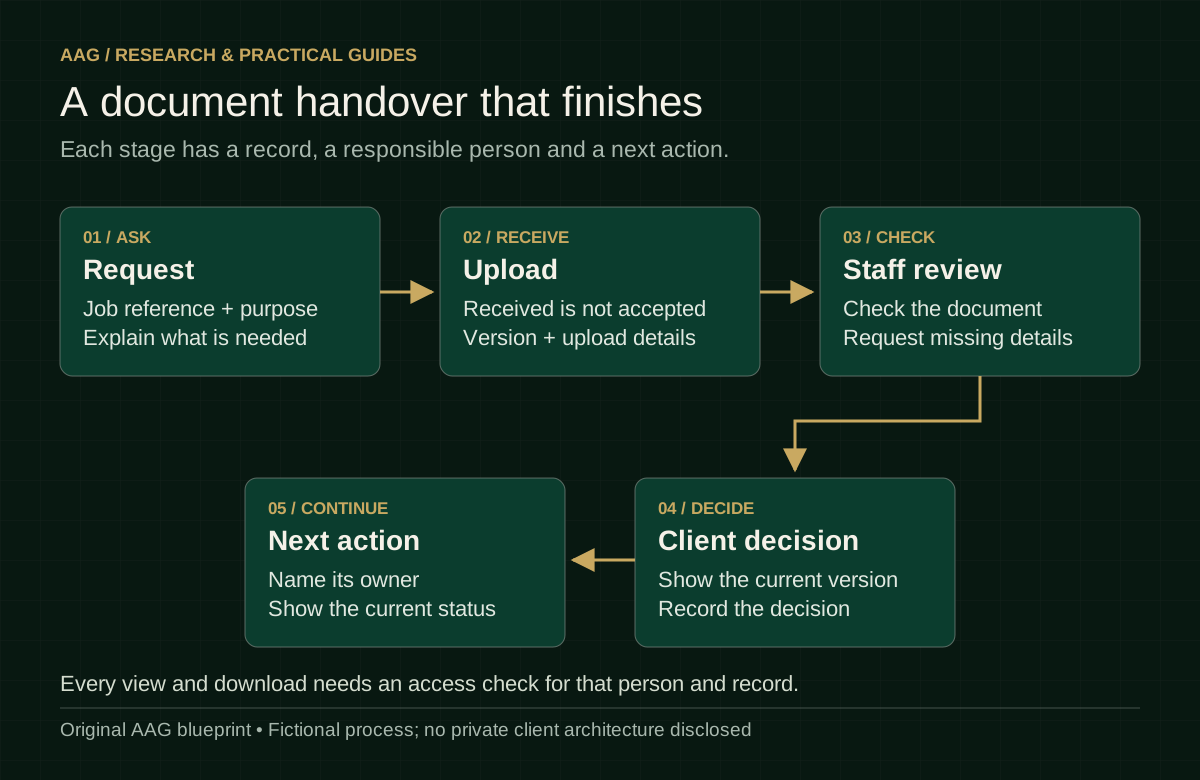
Figure 1. Original AAG operating blueprint using fictional process states.
5. Make access specific to the person and the record
The most important portal question is not “can this person log in?” It is “can this person access this particular record for this particular action?” A landlord with two properties should not automatically see another landlord's documents. A contractor may need the address and work description without seeing unrelated financial records or private tenant correspondence.
OWASP's authorisation guidance recommends minimal necessary privileges, denial when no permission applies and checking permissions on every request. A hidden button is not an access rule. The server needs to enforce the decision even when a person directly requests a document or changes an identifier. Source 3
Our original planning exercise is to write a permission sentence for every role: “A contractor assigned to this job can view the job brief and upload completion evidence.” Then write a negative test: “The same contractor cannot open another job by changing the URL.” Repeat for owners, tenants, staff and former users. Review exports and attachments too. A restricted screen is of little comfort if its download link works for everyone.
6. Treat an upload as the start of a review
A successful upload means the system received a file. It does not mean the file is safe, relevant, legible or sufficient. Distinguish received, checked and accepted states where those differences matter. A tenant uploading a blurry photograph should receive guidance on what is missing rather than being told that the entire issue has been resolved.
OWASP's file-upload guidance recommends controls including permitted file types, validation, size limits, generated storage names, authorised access and appropriate storage separation. It also discusses scanning or other content checks where applicable. No one control makes an upload harmless, so the implementation should combine measures proportionate to the risk. Source 4
Keep the experience understandable. State accepted formats and the size limit before the person chooses a file. Show progress for a slow upload and give an intelligible error if it fails. Retrying should not silently create duplicates. Do not expose private storage locations in a public preview. For the business, include a way to quarantine or remove an unsuitable file while preserving enough context to explain the action.
7. Design a document checklist with meaning
A useful checklist tells the person what is required, why it is needed and whether the submitted item has passed the relevant check. A tick labelled “document present” should not imply that its contents are valid. Where the business must verify something, name that step separately.
Consider an illustrative inspection pack with a report, supporting photographs and an owner's acknowledgement. “Complete” could mean all files exist, the agent reviewed them or the owner acknowledged them. Those are three distinct milestones. Display them separately if the next action depends on the difference. Avoid making customers interpret an internal shorthand.
A checklist can also prevent excessive requests. If a particular process needs one photograph of the fault, do not require a whole property inventory simply because the upload component supports multiple files. Give people a route to say that an item does not apply. AAG's downloadable document matrix helps teams define the purpose, audience, reviewer and completion rule before building the screen.
8. Give the customer a real receipt
After a submission, show a clear completion page. It should identify what was received, provide the job reference, explain who will review it and say what the person should expect next. A confirmation should accurately describe the action that succeeded. “Request received” is different from “appointment confirmed”.
The GOV.UK Design System's confirmation pattern includes next steps, contact information and a reference when one exists. Its guidance offers a useful pattern for reassuring a person at the end of a transaction. Private businesses can adapt that design thinking without copying government branding or implying official approval. Source 5
For consequential decisions, show the details before final submission. The GOV.UK check-answers pattern gives users an opportunity to review and correct information. Applied to our quotation example, a review screen might show the job, supplier, document version and the exact decision being recorded. It should not introduce hidden contractual wording at the last moment. The effect of an approval still depends on the business's actual terms and process. Source 6
9. Use notifications as pointers, not duplicate filing cabinets
A message should draw attention to a meaningful change. It can say that a quotation needs review and direct the person to the familiar portal. It does not have to attach every document or repeat private information. Keeping the current record in one controlled place reduces the chance that an old attachment is mistaken for the latest version.
Choose the notification events carefully. “You have a new message” can be vague; “Your repair request needs one more photograph” gives useful context without exposing the full record. State who sent the update and what action is required. Give the recipient a way to reach the service through the website they already know, rather than forcing reliance on an unfamiliar shortened link.
Plan delivery failures. The business needs to know when a notification could not be delivered, but a delivery receipt does not prove that the person read or understood it. Do not mark a legal or operational duty fulfilled merely because software attempted an email. Keep the official process and any required alternative contact method clear.
10. Collect less, explain clearly and retire old records
ICO data-minimisation guidance supports collecting only personal information that is necessary and relevant to the stated purpose. In our repair example, the design question is whether each field helps the team handle that repair. Avoid collecting extra identification documents simply because a generic form template includes them. Source 7
ICO transparency guidance says people should receive clear information about purposes, retention and sharing when their data is collected. A portal therefore needs an accurate explanation of the businesses involved, not just a generic privacy link copied from another website. Source 8
Retention must match the record and its purpose. ICO guidance does not set one universal time limit for every category. Document the justified period, the review or deletion action and who carries it out. Include exported files and backups in the operational discussion. Do not equate moving a record into an archive with deleting it. Source 9
These points are a starting checklist, not a complete data-protection assessment. In particular, identity evidence, health information and information about vulnerable people can require additional care and specialist review.
11. A worked example with honest arithmetic
Imagine a fictional agency that handles twenty quotation approvals in a month. For illustration only, assume the current process needs three clarification contacts per approval, each taking four minutes of staff handling. That totals 240 minutes. Suppose a pilot reduces the average to one clarification contact, while the number of approvals and average handling time stay the same. The corresponding total would be eighty minutes, a difference of 160 minutes.
Those figures are invented to show a calculation, not a promise of savings. The scenario excludes setup, training, checking and any additional work caused by the portal. It also assumes comparable cases. In a real evaluation, measure those factors before calling the difference a net benefit.
The most useful question is what the contacts were about. If people were asking which version to approve, clearer document status might help. If they were disputing the work itself, a portal alone may not change the discussion. Counting contact volume without understanding its purpose can reward the wrong behaviour, such as making the business harder to reach.
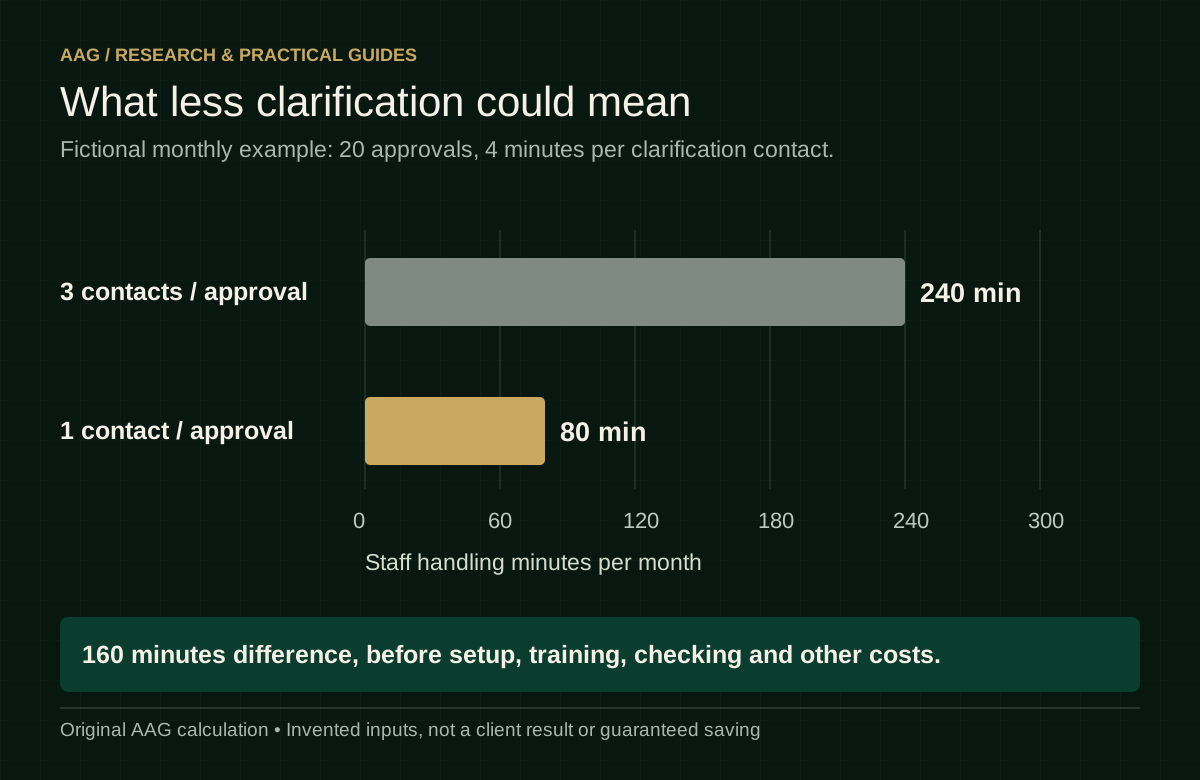
Figure 2. Original AAG fictional calculation. No client performance data, forecast or guaranteed saving.
12. Test the whole service on a small phone
A client may open the portal outside a property with a weak connection. A contractor may have gloves on and photographs stored on a phone. A landlord may return after several months and need to recover access. These are ordinary conditions, not edge cases to postpone until launch.
Test the important tasks at narrow screen widths and with enlarged text. Can someone read the document title, distinguish its version and understand the action without horizontal scrolling? Can they upload a photograph without losing their written explanation? If the connection drops, does the interface make it clear whether anything was saved?
Keep the first screen focused. Show outstanding decisions, recent changes and a dependable route to records. A dozen graphs will not help a client who only needs to approve one quotation. Charts should answer a real question, such as the number of unresolved jobs by age, and should state the period and definition. Always provide the underlying records so that a summary can be checked.
13. Introduce the portal without creating two conflicting systems
A common rollout mistake is to introduce a new portal while leaving the old process equally authoritative. Staff then update the spreadsheet, the inbox and the portal, hoping all three agree. Decide which system holds the current status and how the other tools relate to it.
Start with a defined group of fictional test records, then a limited pilot whose participants understand the process. Agree how existing open jobs enter the system. Do not migrate old material simply because it is available. Check that each item has a purpose, an owner and the right audience before moving it.
Write a short support procedure. Who helps someone who cannot log in? Who handles an incorrect attachment? How is access removed when an employee or contractor leaves? What happens if the portal is unavailable? Run those situations as a rehearsal. A launch is more credible when the team has practised recovering from an ordinary mistake than when it has only watched the happy-path demonstration.
14. Measure progress without making up a case study
Choose measures that describe the intended improvement. For document handovers, useful candidates include missing-item requests, time waiting for a decision, duplicate uploads and contacts asking for status. Define the start and end points. “Time to complete” is meaningless if one person measures from first enquiry and another from the final document arriving.
Record the number of cases and explain the period. Separate ordinary jobs from unusually complex ones rather than quietly excluding the difficult work. If a before-and-after comparison coincides with a staffing change or a seasonal shift, state that limitation. A small pilot can identify a promising direction without proving a causal effect.
Combine numbers with examples of confusion removed. An anonymised note that a client could identify the latest quotation is useful evidence about clarity. It is not permission to publish their documents or a testimonial. Get the relevant publication authority before using client material, and keep confidential records out of marketing screenshots. Fictional demonstration data should be labelled as fictional.
15. AAG's take: build around the next decision
The most convincing customer portal is not the one with the longest feature list. It is the one where a person can find the correct record, understand its status and complete the next useful action. A clear handover often deserves more design attention than the dashboard that introduces it.
For a property business, start by separating property information, job information and the people entitled to see each. Make document versions and approval states explicit. Keep the notification short, the record dependable and the exception route human. That gives the business a practical foundation for later reporting or automation.
Use the downloads below to prepare one process. Bring an anonymised example to a conversation about customer portals or business systems. We can discuss whether an existing product, an integration or a tailored system is proportionate. Do not send identity documents, tenancy files or other people's personal records through a general enquiry form. A fictional example can explain the problem without revealing the people involved.
Downloads
Download the portal document matrix, CSV. Open the printable portal pilot acceptance checklist.
Sources and further reading
- UK government. Cyber Security Breaches Survey 2025. Official survey publication; fieldwork in autumn and winter 2024, reporting the preceding twelve months. Estimates are not individual-business predictions.
- National Cyber Security Centre. Small organisations guide to cyber security, published 9 April 2026, reviewed 21 July 2026.
- OWASP. Authorisation Cheat Sheet. Technical guidance, not a certification of this article or any product.
- OWASP. File Upload Cheat Sheet. Technical guidance for layered upload controls.
- GOV.UK Design System. Confirmation pages.
- GOV.UK Design System. Check answers.
- ICO. Data minimisation.
- ICO. The right to be informed.
- ICO. Storage limitation.
Sources checked 13 October 2026. The ICO marks the linked guidance as under review following the Data (Use and Access) Act. Consult the current guidance and appropriate professional advice for implementation-specific questions.
The blueprint, worksheet, worked example and practical planning method are original AAG materials. They use fictional information. Source organisations do not accredit, endorse or certify AAG by being cited. This article provides general operational design information and is not a legal opinion, a tenancy-compliance checklist or a guarantee of security or commercial results.
KEEP EXPLORING
Another useful perspective.
Customer portals · 25 Sept 2026
A customer portal acceptance checklist
Check the real tasks, account boundaries, documents and recovery routes that a customer portal needs before it is ready for everyday use.

Research guides · 13 Oct 2026
Practical AI for UK small business: a controlled pilot blueprint
A practical guide to choosing a useful AI task, testing its quality, protecting information and measuring the full cost. Includes diagrams and a pilot worksheet.

Hospitality systems · 13 Oct 2026
Hospitality queues and bookings: a practical customer-flow blueprint
A research-backed guide to restaurant bookings, walk-ins and digital waiting lists, with a service blueprint, queue examples and free pilot worksheets.