Open the tracker
It starts with an empty company list. Read the short storage notice before adding records.
 Consultancy · Systems · InfrastructureGet in touch
FREE ONLINE OFFICE TRACKER
Keep company accounts and VAT dates, document checklists and notes together. Open the tracker here on the website, with no account or subscription. Your records stay in this browser on this device. Check every deadline against official records or with your accountant before relying on it.
SEE WHAT YOU WILL USE
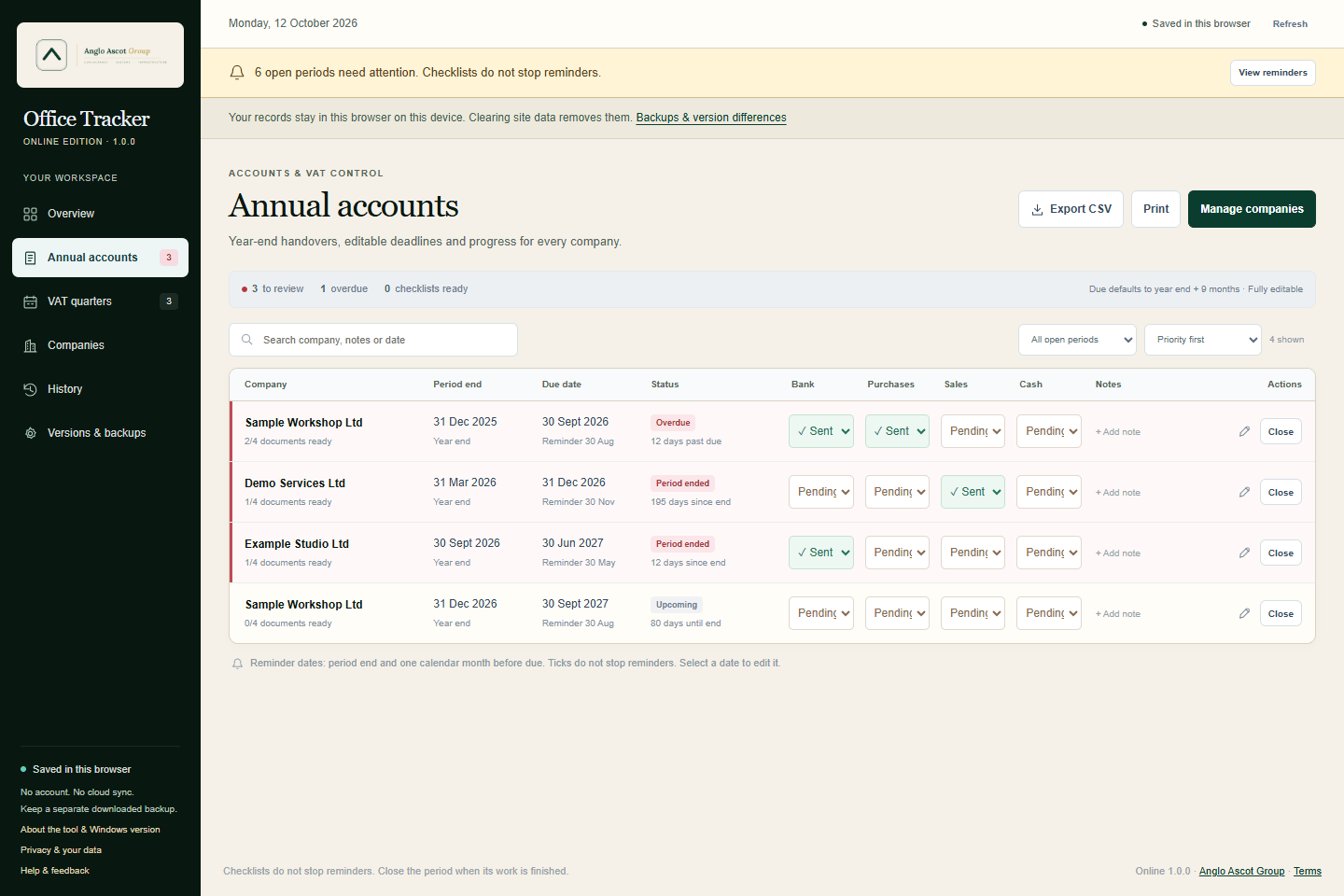
Office Tracker Online, shown with fictional example records.
 Open the online tracker
TWO VERSIONS. DIFFERENT WAYS TO WORK.
The online version is the main version. Open it on this website and reload the page to receive published updates. It does not need an installation. Internet access is needed to open or reload it; offline availability is not guaranteed.
The Windows download is a separate public beta. It works offline after setup and has Windows reminders. It is updated separately and may become outdated or go for a long time without an update. It does not update automatically. The two version numbers describe different editions, not which is newer.
Use a current browser on a trusted device. Records are saved in this browser, without cloud sync. Due and overdue reminders are shown while the tool is open; it cannot remind you when the tab is closed. Export a JSON backup regularly.
A separate download for 64-bit Windows 10 / 11. Local files and Windows reminder tasks. Your PC must be running and you must be signed in for reminders. Unsigned beta scripts may be restricted by your organisation.
MADE FOR EVERYDAY OFFICE WORK
Add a company once. Keep overdue work visible, close completed periods and revisit the history without creating another spreadsheet.
Keep company details and contacts together. Track accounts, VAT or both, then edit or archive the company when needed.
Use suggested dates as a starting point, then edit them to match the actual deadlines. First accounts, changed periods and special VAT schemes need particular care.
Track bank statements, purchase invoices, sales invoices and cash invoices as pending, sent or not applicable.
Add notes to each period, close completed work and revisit the history. Document checklists do not silence an open period's reminders.
The online tool shows due and overdue work while open. The Windows edition has its own local reminder tasks. Neither version files returns.
Export CSV for a spreadsheet and JSON for a restorable backup. Browser records can be lost if site data is cleared, private browsing ends or you change devices.
START HERE
Use a trusted device and protect your login. Anyone with access to this browser profile can see the saved records. There is no separate tracker password or cloud account.
It starts with an empty company list. Read the short storage notice before adding records.
Choose accounts, VAT or both. Check each actual due date before relying on suggested dates.
Export a backup after important changes. Keep exported files somewhere safe; clearing this browser does not delete downloaded backups.
OPTIONAL WINDOWS DOWNLOAD
Public beta 2.1.0-beta.3 for 64-bit Windows 10 / 11. Free personal or business use. It may not receive updates for a while. This edition saves records under your Windows account and works offline after setup. This maintenance release improves uninstall reliability when Windows briefly keeps an app file in use. It keeps the same records format and tracker features.
Download the ZIP, choose Extract All and open the extracted folder.
Double-click using your usual Windows login. Administrator access is normally unnecessary. Setup downloads a portable runtime from nodejs.org if needed.
Start in Companies, enter the details and confirm the actual dates. The public edition starts with an empty company list.
Use the Office Tracker - Test Reminder shortcut to check the pop-up on your PC.
CHECK YOUR DOWNLOAD
The ZIP includes its version, setup guide and free-use permission. Setup downloads a portable runtime from nodejs.org if needed. Keep records backed up and test a few entries before relying on this beta.
BEFORE YOU START
Yes. Both editions are free for personal or business use, with no account, payment or subscription. Read the tool terms before use.
The online tracker saves records and a previous safety copy in this browser profile on this device. The Windows edition saves local files under your Windows account. The tracker does not send company records to Anglo Ascot Group. These records are not encrypted by the tool. Use a trusted device and protect your browser profile, Windows login and exported backups.
It organises dates, notes and document progress. It does not file returns, connect to HMRC or Companies House, or provide accounting or tax advice. Confirm dates against official records, especially first accounts, changed accounting periods and special VAT schemes.
Online: no. The reminders are inside the open tool. Closing the tab stops them. Windows: its local tasks can show reminders at sign-in and during the day while the PC is running. Missed events can catch up when you next sign in or open that edition. Close a period to stop its reminders; document states alone do not stop them.
No. There is no live sync between browsers, devices or the Windows edition. Online JSON backups can be restored in the online edition on another browser or device. Online and Windows backups are not interchangeable. Imports are validated; an unsupported backup is rejected rather than silently changing its contents.
Online: export a backup, then reload the page to get the published version. To remove the online records, use Erase local records; this removes the main record and its previous safety copy. Downloaded backups must be deleted separately. Windows: close it, extract a new ZIP into a fresh folder and run update.cmd under the same Windows login. Uninstalling keeps saved records and backups; the included guide explains full removal. Windows updates are separate and may be infrequent.
HELP US IMPROVE IT
Email contact@angloascotgroup.com with the edition and version, your browser or Windows version, and what happened. Remove company details from screenshots, exports or logs before sharing them. Support and updates are provided as time allows.
A SMALL TOOL. A PRACTICAL EXAMPLE.
Need shared records, approvals or a tool built around your team? Anglo Ascot Group builds websites, customer portals and bespoke business systems around the work you actually do.