
Research guides · AAG RESEARCH GUIDE
Workflow automation, CRM and integrations: a practical business guide
Choose what to automate, decide which system owns each record and make failures recoverable. Includes a process blueprint, transparent effort example and worksheet.

Short version
Workflow automation is useful when it removes a repeated task while keeping responsibility and recovery clear. Start with one complete process, such as an enquiry becoming an assigned job. Define the record, the stages, the owner and the exceptions before connecting software. A CRM manages customer relationships; an operational system manages the work; an integration moves agreed information between them. They can overlap, but buying one does not automatically solve the other problems. This guide explains how to choose between improving a spreadsheet, configuring existing software and building a small custom system. It includes a practical automation blueprint, an illustrative time calculation, failure scenarios and a downloadable planning worksheet. Primary sources support the technical and research points. AAG's recommendations and invented teaching examples are identified separately. No percentage improvement is presented as a guaranteed outcome or a client result.
Long version: automate a defined job
The phrase workflow automation can describe everything from a simple reminder to a chain that updates several business systems. That range makes it easy to buy a tool before anyone has agreed what it should accomplish. A useful starting point is much more ordinary: choose a piece of work that repeatedly gets delayed, copied or chased.
Imagine a small maintenance company receiving enquiries through a website and email. Someone copies the details into a spreadsheet, checks whether the customer already exists, assigns a colleague and later asks for a progress update. The problem is not automatically the spreadsheet. It could be missing ownership, inconsistent information or the absence of a clear next step.
An effective system makes the work visible and dependable. It should be possible to answer what arrived, who owns it, what stage it has reached and what happens when a step fails. Automation can then remove carefully chosen repetition. If those questions remain unanswered, connecting more applications may simply move the confusion faster.
1. Write the process in ordinary language
Take one real example from start to finish and describe it without software names. A customer asks for help. A team member checks the request. Someone agrees the scope. A job is scheduled. The work is completed. The customer receives the agreed document or confirmation. This creates a shared explanation that an owner and a developer can both challenge.
For each stage, record what must be known, who acts and what proves completion. Include the awkward cases: incomplete details, a cancelled request, a customer who changes their mind and a colleague who is absent. These exceptions often explain why a process still needs attention after the attractive demonstration has finished.
The GOV.UK discovery guidance encourages teams to examine the problem before committing to a proposed solution. Our application for a small business is proportionate: a focused process review can reveal whether the right change is a clearer rule, an existing feature or new software.
2. Distinguish a CRM from an operating system
A customer relationship management system, or CRM, organises information about people, organisations and commercial conversations. It can help a team remember who asked for what, which opportunity is active and when to follow up. That is valuable, but it is not the same as controlling the work after a sale.
An operational system may need job stages, documents, approvals, deadlines and role-specific views. A customer portal exposes an appropriate part of that information to the customer. An integration connects applications according to defined rules. One product can provide several of these functions, but the functions should still be understood separately.
Use this distinction when evaluating software. Ask the supplier to demonstrate your actual task using representative sample data. A polished contact list is not proof that document control works. A colourful pipeline is not proof that permissions fit the business. Evaluate the behaviour that matters at the moment staff need it, including what happens when a record is corrected.
3. Give each important fact an owner
Two systems can contain the same customer name without either being a reliable source. Decide where each important fact is maintained. The accounting system might own invoice status, while the operations tool owns job completion. The CRM may hold relationship notes. Other applications should consume the information they need without silently becoming competing masters.
Use a stable record identifier to connect related items. Names can change, emails can be shared and a customer can place several orders. A unique job reference gives the team a dependable way to connect the enquiry, documents and updates without relying on someone remembering which version is correct.
Document the direction of each integration. If an address changes in two places, which change wins? Can staff edit a copied field, or should they open its authoritative source? These decisions should be visible in the interface and the handover notes. Otherwise the apparent convenience of synchronisation can create arguments about which record the business should trust.
4. Design a small and meaningful set of stages
A status should explain a real operational condition. New, awaiting information, ready to schedule, in progress and completed might be useful for one process. Another business may need different stages. Avoid importing a large template simply because the software offers it.
Each stage needs an entry condition and a next action. Awaiting information should say what is missing and who is expected to supply it. Completed should have a clear meaning, such as the work and required documents being finished. If staff use completed to mean several different things, reports and reminders will be unreliable.
Keep temporary flags separate when they describe a different dimension. A job can be in progress and also urgent. A document can be missing while the customer has already paid. Combining all these facts into one long status list produces labels that are difficult to filter or explain. Separate fields can make the record clearer without adding unnecessary pages.
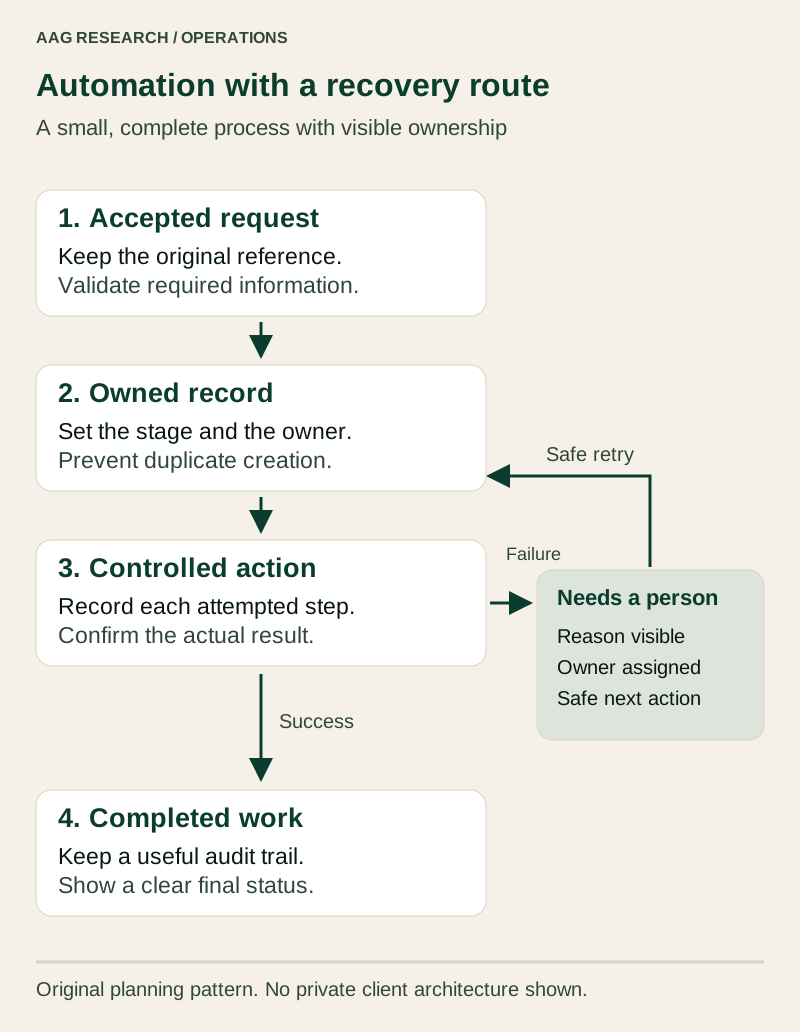
Original AAG architecture schematic. This is a planning pattern, not a diagram of a particular client's private system.
5. Remove unnecessary work before automating it
Some repeated tasks exist because information is missing or the business has inherited an old habit. If staff copy a value between three spreadsheets, first ask why all three need it. One shared view may remove the task entirely. An integration is not automatically better than deleting an unnecessary handoff.
Look for repeated questions as well as repeated typing. A clear status page may prevent several progress enquiries. A required document checklist may reduce last-minute checking. A sensible default can save a small decision on every record. These improvements can be easier to maintain than a complex chain of automated actions.
Our preferred first candidate has a clear trigger, predictable rules, modest consequences and a visible owner. Creating an internal task from an accepted enquiry can fit that description. Automatically approving a financial commitment based on a vague message does not. The level of autonomy should reflect the quality of the information and the cost of being wrong.
6. Decide whether to configure, integrate or build
Configure existing software when the business problem matches a supported feature and the limitations are acceptable. This may involve improving a form, setting permissions or creating a useful view. The value comes from the fit, not from whether the solution is custom.
Integrate when two useful systems need to exchange a small, well-defined set of information. Keep the exchange narrow enough to explain. A job-complete event creating a draft invoice is different from copying every field between every application. Each additional direction and field increases the number of decisions that must remain correct.
Build a focused tool when the essential workflow does not fit available options and there is a realistic plan for ownership, support and change. A bespoke system should not reproduce an entire software suite unnecessarily. Define the narrow advantage: clearer document control, a specialised operational view or a task that existing products cannot handle comfortably.
7. Calculate value without disguising assumptions
Measure the current task before predicting savings. Record how often it occurs, the active time spent and the time spent correcting errors. Waiting time is different from staff effort. A request waiting overnight may affect the customer even when it consumes only a minute of typing.
Consider an illustrative process with 40 cases per week and six minutes of manual handling per case. That is 240 minutes. Suppose a proposed design needs one minute per case for review, plus 40 minutes of weekly exception handling and upkeep. The planned total is 80 minutes, leaving a hypothetical difference of 160 minutes, or two hours and forty minutes.
These figures are a teaching example, not a forecast for another business. The assumptions must be checked during a pilot. Do not multiply every minute by a billing rate and call the result extra revenue. Freed capacity only becomes a financial benefit when it changes useful output, costs, service quality or the owner's workload in a meaningful way.
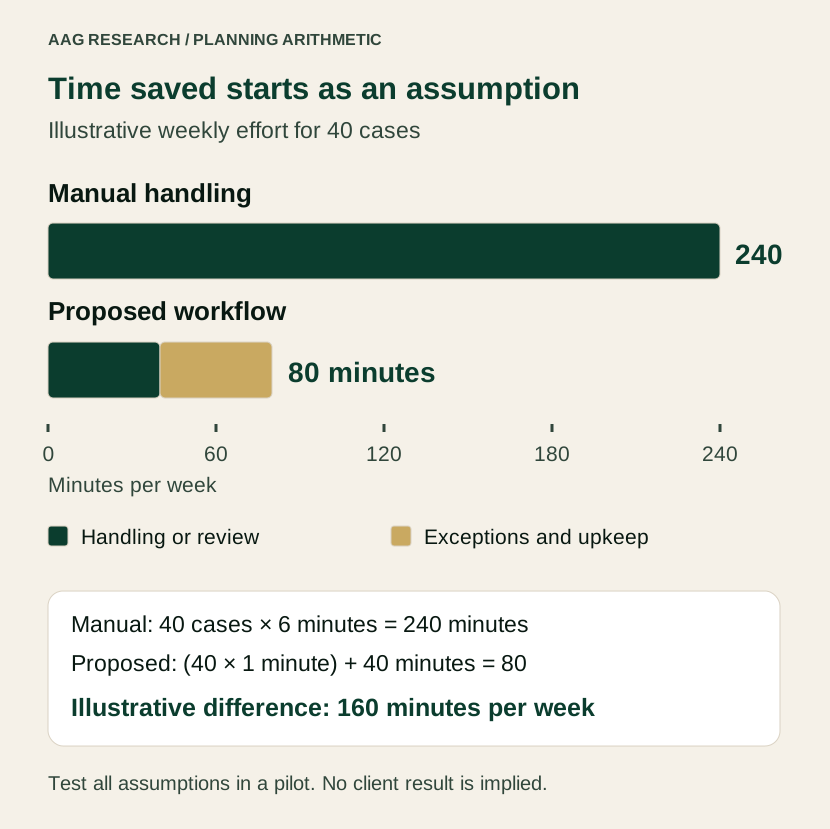
Illustrative planning values only. The proposed 80-minute total is an assumption to test, not measured AAG or client performance.
8. Make repeated events safe
Connected systems often communicate by sending an event when something happens. An event might mean that a payment succeeded or a job changed status. The receiving system must not assume the message will arrive only once.
Stripe's webhook documentation explains that duplicate events can occur and that delivery order should not be assumed. Cloudflare's queue documentation also describes an at-least-once delivery model. These are product-specific examples of a problem an integration designer must examine for the actual services involved.
In ordinary language, the system needs a dependable way to recognise work it has already done. Use an event or operation identifier, record progress and enforce the relevant uniqueness rule where the action is committed. A duplicate notification should not create a duplicate invoice or job. Ask for a demonstration in which the same event is deliberately delivered twice and the final business record remains correct.
9. Plan for partial success
An integration can complete one action and fail on the next. The job may be created while its confirmation email fails. Treating the whole operation as simply successful or unsuccessful can make recovery dangerous. Re-running everything might create another job even though only the notification needs attention.
Record enough progress to distinguish accepted, pending, completed and failed steps. The operator should see what happened and which action is safe to retry. Where an action has consequences that need reversing, define the compensating action explicitly. Cancelling a reservation, for example, is not the same as pretending it never existed.
Microsoft's compensating-transaction pattern describes recovery from partially completed work and notes that some situations require manual intervention. Our practical expectation is simple: a business should have a visible route out of an incomplete process, rather than relying on a developer to interpret an unexplained error message.
10. Give exceptions a place to live
An automation is only partly designed when the normal path works. Create an exception view for records that need a person. Show the reason, the affected record, the last attempted action and the next safe step. Avoid exposing secret keys or unnecessary personal data in the error details.
Decide who checks that view and when. A failed task with no owner is just another hidden inbox. Some issues need an immediate operational response; others can wait for a routine review. Match the visibility to the consequence rather than sending an urgent message for every minor event.
Include a way to pause the automation without losing incoming work. The team should know whether new requests will queue, be handled manually or be rejected with an honest explanation. A pause control is especially useful during a supplier outage, a change to business rules or an investigation into unexpected behaviour.
11. Collect less and protect the necessary information
Data fields should have a purpose. Do not copy an entire customer record into every connected service because the integration makes it easy. A task-assignment tool may need a job reference and a short description without needing all the customer's historical correspondence.
The ICO's data-minimisation guidance explains that personal information should be sufficient, relevant and limited to the stated purpose. It was marked as under review when checked. Use current guidance and appropriate advice for the actual processing, especially where sensitive information or international transfers are involved.
Write a simple data map: what is collected, where it goes, who can access it and how it is removed when no longer needed. Confirm the relevant provider terms and responsibilities. These records are part of operating the system responsibly; a privacy-policy paragraph cannot replace the underlying decisions and practices.
12. Design permissions around real responsibilities
Small teams still need boundaries. A staff member may need to update job progress without being able to change system settings or export every customer's information. A manager may need reports without needing access to credentials. Define these differences before sharing accounts becomes a habit.
Use individual accounts so actions can be attributed appropriately and access can be removed when someone leaves. Protect important accounts with suitable additional authentication. NIST's small-business guidance explains how multi-factor authentication adds identity checks beyond a password. It is useful technical guidance, not a certification of a particular implementation.
Test access boundaries with representative accounts. Check that a user cannot obtain restricted records by changing a link or calling an endpoint directly. A hidden button is not an access control. The server or underlying data layer must enforce the rule, including exports, attachments and records belonging to another customer.
13. Keep an audit trail that answers useful questions
An audit trail should help establish what changed, when it changed and which person or process made the change. It should distinguish a user action from an automated update. For important corrections, retaining the reason can be more helpful than collecting a large volume of technical noise.
Do not treat logs as a place to dump everything. OWASP's logging guidance identifies sensitive material that should normally be excluded, such as credentials, access tokens and certain personal information. Logging itself needs appropriate access and retention controls.
For an operational review, start with a concrete question: why did this job receive two reminders, or why was this document marked complete? The audit trail should provide a concise answer. If nobody can connect the entries to a business record, more logging volume may not improve accountability. Clear identifiers and event descriptions are often more valuable than exhaustive raw payloads.
14. Pilot the smallest complete slice
A pilot should include the entire useful journey for a limited scope. For example, accept one type of enquiry, create its record, assign its owner and show completion. Testing only the first trigger proves little about what happens later.
Use representative sample records that cover the normal case and expected exceptions. Include a missing field, a duplicate event, an unavailable downstream service, an unauthorised user and a corrected record. Check the business result after each scenario. A green technical response is not enough if the wrong customer received the wrong document.
Run the pilot with the people who will use it. Ask them to find a record, explain its status and recover a failed step. Capture unclear labels and unnecessary clicks while the scope is still small. This helps prevent a familiar problem: the developer understands the system because they built it, while the team needs a separate explanation for every action.
15. Migrate carefully and keep an exit route
Existing records usually contain duplicates, inconsistent names and missing values. Decide which problems must be corrected before import and which can be clearly flagged afterwards. Keep a record of how fields were mapped, and compare source and destination totals using the same inclusion rules.
Do not assume that a backup file proves recovery works. Test whether the necessary records and attachments can actually be restored in an appropriate environment. Confirm who holds the account access, what the export includes and which parts of the system depend on a provider-specific feature.
An exit plan need not be elaborate. The business should know how to obtain its information in a useful format and what would be required to move. Record the custom rules, integration credentials ownership and recurring dependencies. This makes the system less dependent on one person's memory and gives future maintainers a fair starting point.
16. Measure whether daily work improved
Choose measures that reflect the original problem. These might include active handling time, unresolved exceptions, records without an owner, missing required documents or time from accepted request to first useful response. Define the measurement before comparing periods.
Separate throughput from quality. Completing more records is not an improvement if staff must reopen them to correct missing information. Likewise, fewer reminder messages may indicate clearer work or a broken reminder process. Review a sample of actual records alongside the aggregate numbers.
The UK Business Data Survey 2024 reported that 21% of businesses handling digitised data analysed it for new insights. This is a historical survey estimate, not a measure of automation quality. Our inference is that even a small, well-defined operational report can be a useful step beyond merely storing records, provided someone acts on what it reveals.
17. Assign ownership after launch
Someone needs to own business rules, access requests, supplier changes and unresolved failures. Agree what routine support includes and how a change is requested. A new field can affect imports, exports, reports and integrations, so apparently small edits deserve an impact check.
Keep instructions close to the work. A short page explaining the stages, the exception view and the recovery route is more useful than a large manual nobody opens. Update it when behaviour changes. Remove access promptly when responsibilities change, and periodically review whether the automation is still solving the same problem.
The goal is a system the business can understand and maintain. Automation should reduce unnecessary attention while preserving appropriate oversight. A quiet system with a clear exception list is often more useful than one that constantly announces activity but leaves staff unsure whether the work is finished.
AAG's take: reliability is part of usefulness
We favour a small number of dependable connections over a large collection of clever demonstrations. Start with the record and the responsibility. Make the stages clear. Automate a predictable step. Then prove that duplicates, corrections and failures do not leave the business guessing.
The best first project is often unglamorous: an enquiry reaches the right person, a missing document remains visible or a completed job has a clear record. Those changes matter because they improve the ordinary work that happens every day. Expand only when the team can explain the current process and the evidence supports the next investment.
Download and apply the planning worksheet
Download the workflow automation worksheet. It covers process stages, authoritative records, integration rules, exception ownership, a pilot checklist and a transparent effort calculation.
Explore AAG workflow automation services and business systems. For the customer-facing side of the same process, read the small business website conversion guide.
Before approving an automation
- One complete process and its owner are defined.
- Important records have stable identifiers and an authoritative source.
- Duplicates, corrections and partial failures have been tested.
- Exceptions have a visible owner and a safe recovery route.
- Access rules and unnecessary data copies have been reviewed.
- The business can pause, export and recover the relevant work.
- Support responsibilities and the evidence of success are clear.
Sources and further reading
Reviewed 13 October 2026. This is AAG's practical synthesis, not an academic paper, legal advice or a claim of accreditation by the organisations cited. Diagrams and worked values are original, clearly labelled teaching material. Documentation describes the named services and should be checked again when implementing an integration.
- Government Digital Service, How the discovery phase works, reviewed 13 October 2026. Primary guidance on understanding a service problem before building.
- Stripe, Webhooks, reviewed 13 October 2026. Primary documentation on event delivery, duplicates and integration behaviour.
- Cloudflare, Queue delivery guarantees, reviewed 13 October 2026. Product-specific delivery semantics, not a guarantee for every queue service.
- Microsoft Azure Architecture Center, Compensating transaction pattern, reviewed 13 October 2026. Architectural guidance for recovery from partially completed operations.
- Information Commissioner's Office, Data minimisation, reviewed 13 October 2026. UK regulator guidance, marked as under review when checked.
- National Institute of Standards and Technology, Multi-factor authentication for small businesses, reviewed 13 October 2026. Security guidance from the US standards institute, not an AAG accreditation.
- OWASP, Logging Cheat Sheet, reviewed 13 October 2026. Community-maintained application security guidance and cautions about sensitive log content.
- Department for Science, Innovation and Technology, UK Business Data Survey 2024, published 27 June 2024. Ipsos surveyed 3,911 UK businesses; the data-analysis estimate concerns businesses handling digitised data, not all businesses or AAG customers.
KEEP EXPLORING
Another useful perspective.

Research guides · 13 Oct 2026
Practical AI for UK small business: a controlled pilot blueprint
A practical guide to choosing a useful AI task, testing its quality, protecting information and measuring the full cost. Includes diagrams and a pilot worksheet.

Research guides · 13 Oct 2026
Small business websites: a practical guide to better enquiries
Connect search intent, credible evidence, accessible forms and a dependable response. Includes a website blueprint, an illustrative funnel and a planning worksheet.
Research notes · 13 Oct 2026
Test AI on one business task before making it a promise
A customer-support study found an average productivity gain, but results varied. Here is how to plan a small, measurable trial in your own workflow.